

Imagine scrolling through your phone, searching frantically for those precious photos from your child’s first steps, only to discover they’ve vanished due to a device failure. This heart-wrenching scenario plays out daily for countless families who rely on single-device storage for their irreplaceable memories. While smartphones and computers offer convenience, they remain vulnerable to crashes, theft, and accidental deletions. Network storage drives emerge as a powerful solution, providing a centralized fortress for your digital memories. These intelligent devices not only safeguard your photos, videos, and documents but also enable seamless access across all your devices. By implementing a network storage system, you’ll gain military-grade security, automatic backups, and the peace of mind that comes from knowing your cherished memories are protected. In this guide, we’ll explore how network storage drives work, why they’re essential for home users, and how to set up and manage your own digital sanctuary.
Understanding Network Storage Drives: Your Digital Safety Net
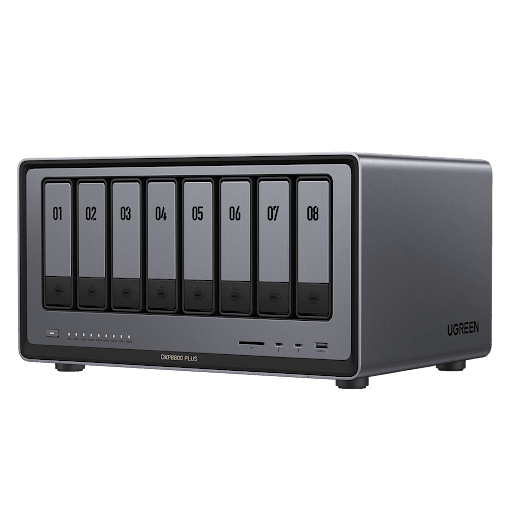
Network Attached Storage (NAS) represents a revolutionary approach to safeguarding digital content, functioning as a dedicated computer that connects directly to your home network. Unlike traditional external hard drives that tether to a single device or cloud storage that depends on internet connectivity, NAS creates an intelligent hub accessible to all your devices simultaneously. At its core, a NAS system combines specialized hardware—including powerful processors, redundant drive bays, and high-speed network interfaces—with sophisticated operating systems designed for 24/7 operation. Think of it as your personal data center: when you save a file, it travels through your home network to the NAS, where it’s stored securely on professional-grade hard drives. The system continuously monitors these drives, ensuring data integrity while maintaining lightning-fast access speeds for multiple users. This centralized approach eliminates the chaos of scattered files across various devices, creating a single source of truth for all your digital content while providing enterprise-level protection for your irreplaceable memories.
Why Home Users Need Secure Network Storage Solutions
The Risks of Unprotected Memories
Recent studies reveal that 1 in 3 home users experiences significant data loss annually, with smartphones and laptops being particularly vulnerable. Device failures often strike without warning – a dropped phone, a coffee spill on a laptop, or an unexpected system crash can instantly erase years of precious memories. More concerning is the rising threat of ransomware attacks targeting home users, with cybercriminals increasingly focusing on personal photo collections as leverage. Traditional backup methods like manual transfers to external drives prove unreliable, as they depend on human consistency and are themselves susceptible to physical damage or loss.
Key Benefits of NAS Storage Systems
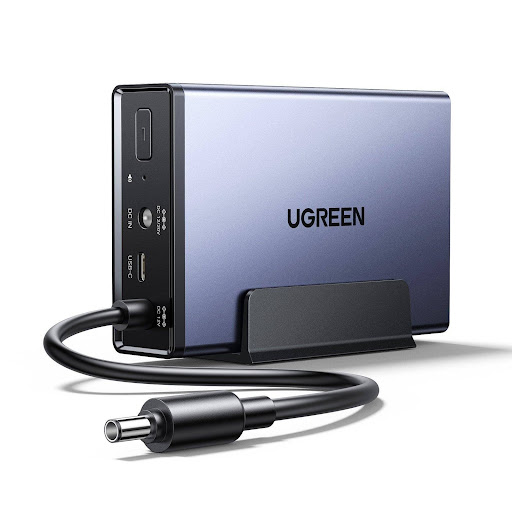
Network storage systems transform how families protect and share their digital legacy. Military-grade AES-256 encryption ensures your memories remain private, while sophisticated access controls let you share specific content with family members. The system works tirelessly in the background, automatically backing up new photos and videos from all connected devices the moment they’re created. Unlike cloud services with monthly fees and privacy concerns, your NAS becomes a personal media hub – streaming photos and videos to smart TVs, tablets, and phones throughout your home. Remote access capabilities mean you can securely view and share memories from anywhere, while maintaining complete control over your data’s location and security.
Choosing Your Ideal Network Storage Drive
Capacity Planning for Home Data Management
Effective storage planning begins with a thorough assessment of your digital footprint. Modern smartphones capture high-resolution photos and 4K videos, with each minute of footage consuming up to 375MB of space. A typical family generates roughly 5-10GB of photos and videos monthly, requiring at least 2TB of storage for five years of memories. For instance, UGREEN’s NAS solutions offer flexible storage configurations that can easily accommodate growing family archives while maintaining data redundancy through RAID configurations.
HDD vs SSD NAS Performance Comparison
While traditional hard drives offer substantial capacity at lower costs, SSD NAS deliver superior performance for frequent access scenarios. SSDs provide up to six times faster data transfer speeds, crucial for smooth photo browsing and video streaming. They also operate silently and consume less power, making them ideal for living spaces. Despite higher initial costs, their enhanced durability and longer lifespan often justify the investment for protecting irreplaceable memories.
Step-by-Step: Setting Up Your Home Network Storage
Hardware Installation Guide
Begin your NAS setup by choosing an optimal location – preferably in a well-ventilated area near your router. Carefully insert your chosen drives into the drive bays, ensuring they click firmly into place. Most modern NAS systems feature tool-less drive installation with clear indicators for proper orientation. Connect your NAS directly to your router using the provided Ethernet cable for optimal performance, though some models offer Wi-Fi connectivity as a secondary option. Position the device away from direct sunlight and moisture, allowing adequate airflow around all sides.
Configuration & Data Migration
Once powered on, access your NAS’s setup interface by typing its IP address into your web browser or using the manufacturer’s discovery tool. Create your administrator account with a strong password and follow the setup wizard to configure basic settings. When establishing user accounts, implement role-based access control – giving family members appropriate permissions for their needs. For data migration, utilize the built-in file transfer tools to move existing content from computers and external drives, maintaining your folder structure for easy navigation.
Advanced Data Management Strategies
Create a structured folder hierarchy starting with broad categories like “Photos,” “Videos,” and “Documents,” then subdivide by year and event. Implement consistent naming conventions using dates and descriptive titles, such as “2023-12-25_Christmas_Family.” Tag media files with relevant metadata, including location, people, and occasions, to enable powerful search capabilities. Leverage your NAS’s built-in photo recognition features to automatically categorize images based on faces, places, and activities.
Protecting Your Digital Legacy: A Smart Investment
Network storage drives represent more than just another tech gadget—they’re the guardians of our digital legacy. By implementing a NAS solution, you take control of your precious memories with military-grade security while maintaining the convenience of instant access from any device. The investment in network storage pays dividends not just in data protection, but in the peace of mind knowing your family photos, videos, and documents are safe from device failures, accidents, and cyber threats. Don’t wait for a catastrophic data loss to take action. Start building your digital fortress today by choosing a NAS system that fits your needs, following the setup guidelines, and implementing proper backup strategies. As our lives become increasingly digital, the importance of protecting our memories only grows. Your future self—and generations to come—will thank you for preserving these irreplaceable moments in a secure, accessible, and organized manner.